How your data flows
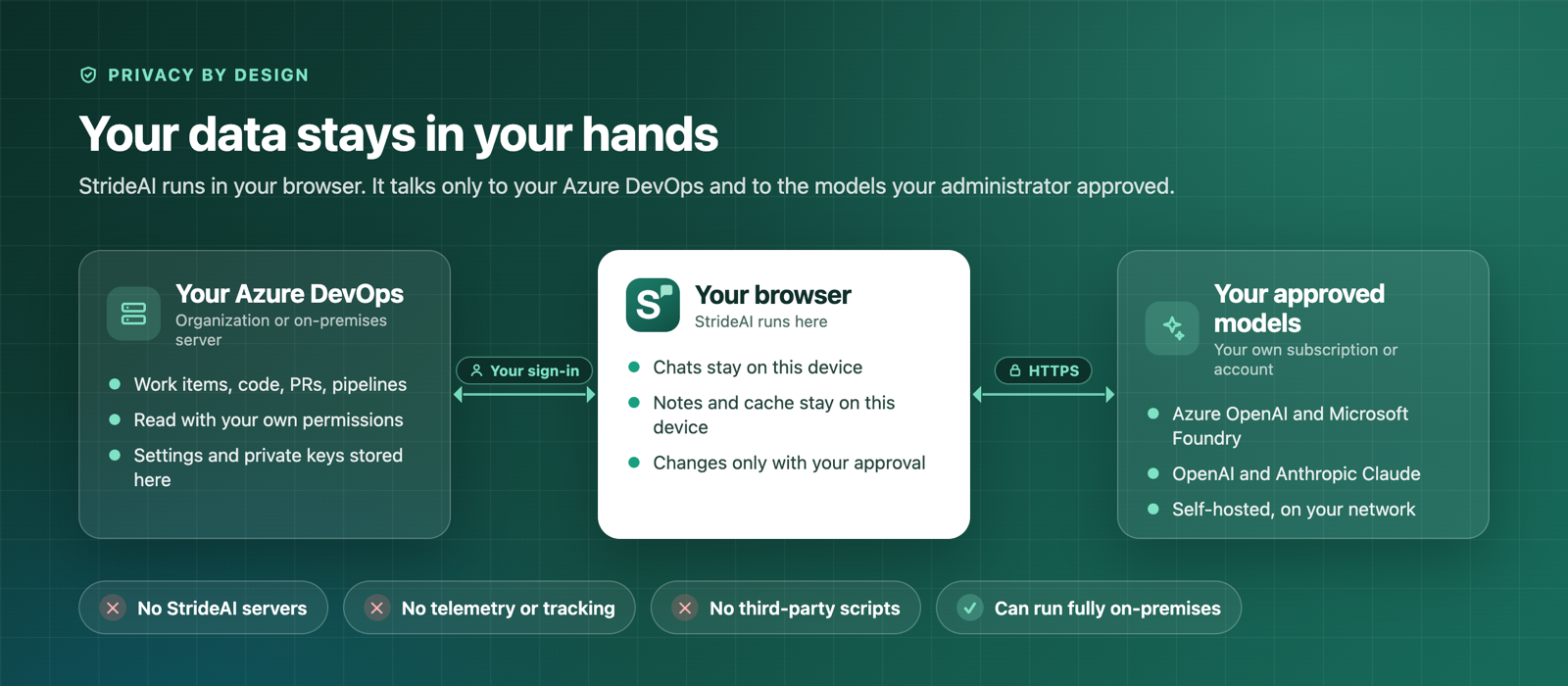
- No StrideAI servers. StrideAI is a set of static files that Azure DevOps, or your own Azure DevOps Server, serves to your browser. There is no StrideAI backend, database or account in the core product, and the publisher never receives your data.
- Only two destinations. Your browser talks only to your Azure DevOps organization or server, and to the model endpoints your Project Administrator or StrideAI manager approved. Other people cannot add endpoints.
- No telemetry or tracking. Nothing is sent to the publisher or any third party, and StrideAI loads no third-party scripts, fonts or images. The only usage it counts is each person’s answers and tokens per model and day, the hour of the week, and how many changes they approved, stored in your own Azure DevOps project. Answers are shown as text, and links open only when you click them.
- Your models, your terms. The model runs in your own Azure subscription or provider account, under your own agreement with that provider. For the strictest setups, use Azure OpenAI or Microsoft Foundry in your own region, or a self-hosted model on your network.
- Your permissions, your approval. StrideAI sees only what the signed-in person can see, and nothing changes until that person approves it.
- Check it yourself. Open your browser’s developer tools on the Network tab while you use StrideAI. You will see requests only to your Azure DevOps and to your model endpoints.
When you use StrideAI Models
Section titled “When you use StrideAI Models”Organizations on an Ultimate or Enterprise plan add one more destination: the StrideAI platform that serves the hosted models and keeps the plan’s seats and credits. It receives what any model endpoint receives (the question, the conversation and the Azure DevOps data StrideAI read to answer), authenticated with the app token Azure DevOps signs for the extension. It does not store prompts or completions by default and reports its data region in Settings. Teams on Free or Pro with their own models never talk to it. When a person signs in, StrideAI also sends their Azure DevOps access token once, so the platform can ask Azure DevOps which organization that person belongs to; the platform uses it for that single check and neither stores nor logs it.
What is sent to the model, and only when you send a message
Section titled “What is sent to the model, and only when you send a message”- Your question and the conversation so far, and the screenshots you attach to your latest message. In a shared chat, that includes the other people’s questions, the answers and their names.
- The Azure DevOps data StrideAI reads to answer it, such as work item fields, code files, wiki pages or pipeline logs.
- Your name, the project name, a short summary of the project’s process, teams and repositories, the team’s instructions and saved notes, so answers fit your team.
Secrets are masked before anything is sent. It goes only to the approved model endpoints, and your provider’s data terms apply; Azure OpenAI does not use prompts and completions to train models.
The pipeline tasks run on your agents, not in a browser. They send the lines a pull request adds (secrets masked), work item and pull request titles, or the report to the model endpoint you configure in the task, and nothing to anyone else.